
Featured

My Digital Footprint

  My Digital Footprint                                                        

The term ‘Social Media’ means to me communication and sharing on the internet. It comes in various forms, through words, photos and videos. It can be information, feelings, thoughts, ideas, humour and messages. It is used by everyday people, family, friends and businesses as well.

I haven’t been very interested in social media for myself. I am happy to look at other peoples’ blogs, Instagram, Twitter and some Facebook pages. I enjoy the ideas, reading the stories and admiring wonderful photos people like to share. Thus far, I haven’t committed to making any contribution. Which is not to say I never will, I just haven’t yet! I am constantly amazed at the variety of information and instruction the web brings in an immediate and convenient way.

The beautiful photo above looks like a place barely anyone would have walked and I was fairly convinced my digital footprint would be the same. There’d be nothing there. When i tried Google, I was surprised to find there was a PDF of Graduates from a course I did in the 1980’s, where my name, course, and graduation year appears. This was a long time before social media even existed, so I was very surprised this material had even made it onto the net!

There was also a possible LinkedIn account which may be mine, but it had no details apart from the same name (no middle name) and Australia.  I may need to follow it up in case it is mine, it would be some years old if it is.

There are a few people with the same name, probably more overseas than in Australia, but I didn’t find any other information pertaining to me.

On dogpile, I didn’t find anything about me or my family.  I looked up some other family members and there was just their professional work profiles visible.

I didn’t find much on the internet and I don’t think there is anything wrong with my Digital Footprint, in terms of negativity. There is no action to take on what was evident. However, I feel it would be beneficial for me to have some type of social media profile with good information and positive content.

In the future, I think it is always necessary to be mindful about what you are putting out there. It is best not to send out anything when angry or when strong emotion is involved or if partying. It is also important to have privacy settings in place, and to be aware of what is happening around one’s accounts and terms & conditions. Ensure that the passwords used are strong ones and the computers all have decent security which is regularly updated to keep one safe.

TAFE SA Social Networking Task

These are the guidelines for the online and social network requirements taken from the ‘TAFE SA Student Responsibilities Document’ which all staff and students need to adhere to.

TAFE SA Online and Social Networking Guidelines

TAFE SA students can be held accountable for their online behaviour in the same manner as they are accountable for their on-campus or TAFE SA-related activity behaviour. In particular, it is an offence to harass, bully, defame or slander any member of the TAFE SA community. Students are also reminded that social networking sites and TAFE SA online learning environments have in place and conditions that discourage activity that could lead to defamation or incitement to hatred. As referenced in these services’ terms and conditions, students should refrain from posting material that is deemed to be criminal; harassing; racially, sexually, ethnically or religiously objectionable; defamatory; obscene; invasive of another’s privacy; or infringing on copyright. If activity on a social networking site or a TAFE SA online learning environment is reported as violating the TAFE SA Student Conduct and Disciplinary Policy, it will be investigated and addressed according to the TAFE SA disciplinary procedures. Given the ease with which student’s entries can be accessed and copied, the record of such misconduct can be used to provide evidence in any subsequent disciplinary action.

Linking Documents

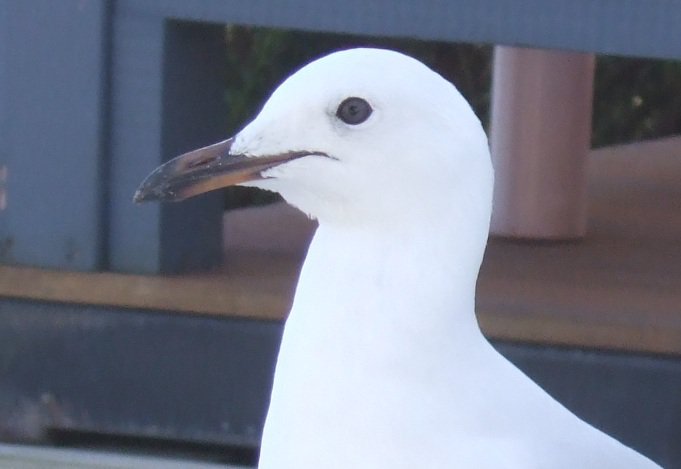
Skittles Seagull

The WordPress site has a few ways to add links to documents. There are three buttons appearing, for example if you want to use an image. You can use the Upload button, you can pick something from the Media Library or you can Insert from a URL. I have uploaded Skittles Seagull to OneDrive and linked the photo to my WordPress site through the Upload button in the Image block.

To link the PDF document, I first unzipped the Sample Upload Files by right clicking on them. I made a new folder in OneDrive and dragged and dropped each file into the folder. I then changed the sharing permissions to ‘anyone with this link can edit’ and copied the URL of the file I wanted. In WordPress I highlighted the words ‘Linking Document’ and clicked on the link icon (paperclip) and then pasted the copied URL into the box and clicked the add link button.

Linking Document

Connecting to social media and RSS

To create the WordPress site I went to wordpress.com and clicked on the ‘Get Started’ button. I put in the name of the site and wrote what it was about. I searched for the free site and created my account user name and password. I then began looking at the Themes and how to customise what was there. The difficult part was deciding on how I wanted the layout to be and choosing a photo. There were lots of options for photo placement and where the text could go. I tried a few different ones before deciding. I found myself being careful, as sometimes I thought I was viewing free layouts, only to discover I wasn’t!

I used about three different photos in a couple of layouts to see how they looked before choosing the photo and design I have. (Apologies for the photo quality, I still have my ‘L’ plates on for a new phone!) The process was relatively easy, but I was a bit concerned I might have published something a couple times when I thought I was doing a draft.

RSS Feeds

RSS is a type of web feed. It stands for Really Simple Syndication or Rich Site Summary. It ‘allows users and applications to access updates to websites in a standardized, computer-readable format’. (http://en.wikipedia.org/wiki/RSS).

The format is usually simple code or text files which are converted by a ‘feed reader’ or some kind of interface into the most recent information. It is a way to get blog feeds, updated information, audio or video episodes, articles, images or news. This is easier than joining up to every blog or site in order to receive their feed. It eliminates the need to check back all the time as the updates automatically come to you.

http://data.eso.sa.gov.au/prod/cfs/criimson/cfs_current_incidents.xml

Design a site like this with WordPress.com
Get started